
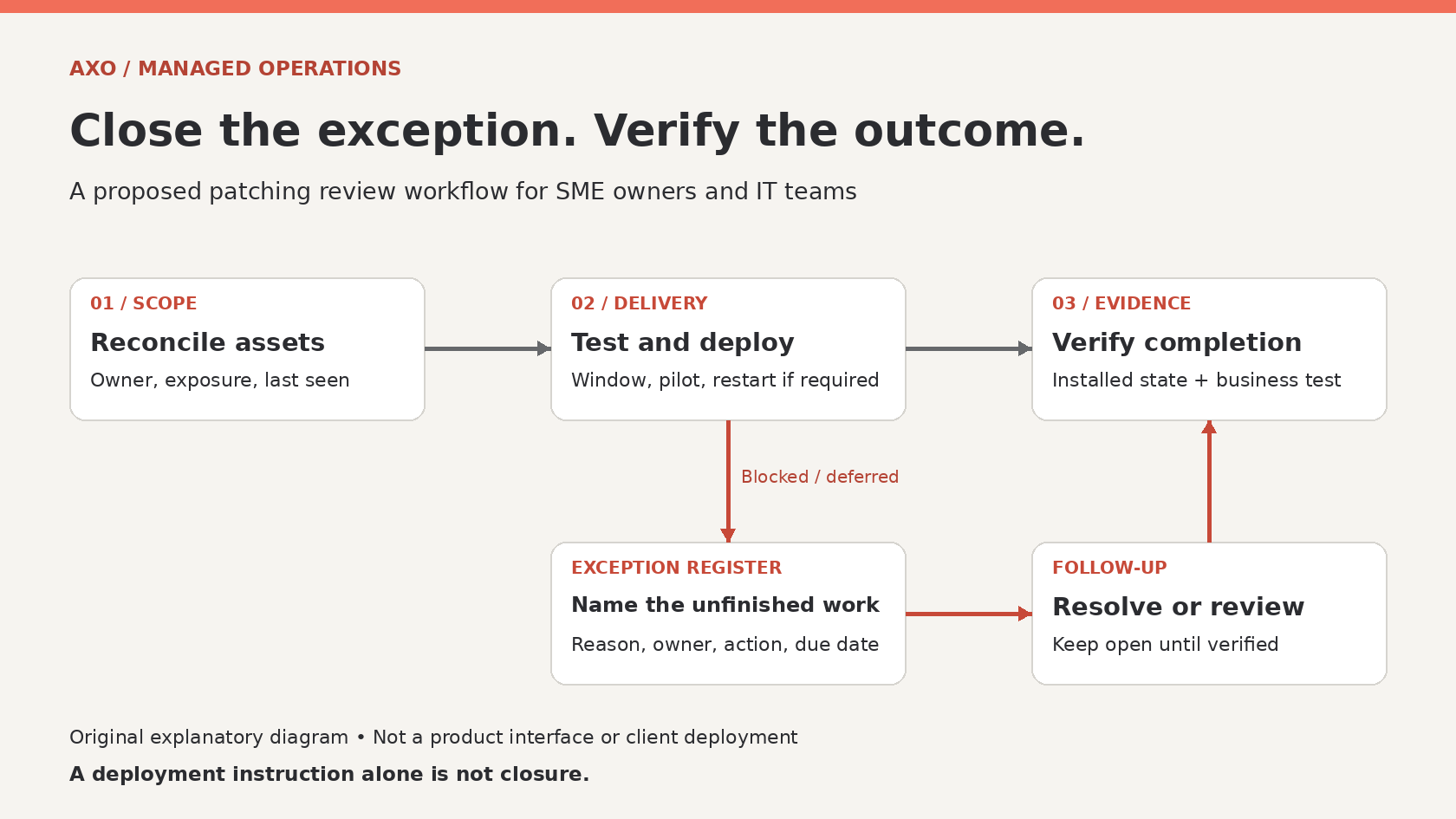
The monthly report says patching is complete. Then someone opens a laptop that has been in a drawer for three weeks. Another employee has postponed a restart. A finance application server was excluded because nobody could agree on a maintenance window.
For a Malaysian SME, these loose ends matter more than a reassuring percentage. A useful patching service makes the unfinished work visible, assigns an owner and proves what happened after deployment. Ask your managed service provider for an exception register alongside the dashboard.
Start with the devices the report actually covers
Before discussing success rates, agree on the population: company laptops, servers, supported applications and network appliances. Include remote workers and spare devices. Record which systems sit outside the contracted service and who maintains them. A Windows report does not establish the condition of a firewall or a third-party accounting package.
Every device should have an identifiable business owner and a recent observation date. Separate retired equipment from equipment that simply stopped reporting. Removing an offline laptop from the denominator can improve the chart without improving security. Keep unknown devices visible until someone establishes their status.
NIST’s patch-management guidance, published on 6 April 2022, includes verification within the patching process and treats the work as preventive maintenance. That supports a practical management question: what evidence closes each item? [1]
Distinguish an instruction from a completed update
A deployment instruction, a download and a completed installation are different events. Where a restart is required, check that it happened and that the device reported back. For a business-critical application, also confirm a representative task still works. An installation record cannot tell you whether staff can generate the invoice they need.
Microsoft’s Intune feature-update documentation illustrates why this distinction matters. It exposes update states, restart stages, last event time and last scan time; reporting also has data latency. These are feature-update reports, not proof that every monthly security update or application is current. Ask for the corresponding evidence for each update type your provider manages. [2]
For your review, separate verified completion, failed installation, required restart, stale reporting and approved deferral. Avoid presenting these proposed management categories as universal vendor-console labels. Your MSP should explain how its tools map into them.
Give each exception an expiry date
An exception register can be simple. Capture the affected asset, missing update, reason, exposure, temporary protection, responsible person, next action and review date. Link it to a ticket so the conversation survives a change of engineer. Business acceptance should identify a named decision-maker rather than a vague note saying “customer aware”.
Keep technical failure and business postponement distinct. A disk-space problem needs remediation; an application compatibility concern needs testing and a decision. Neither should become a permanent exclusion through repeated copying into the next month’s report.
Use exploitation evidence as one prioritisation input. CISA recommends using its Known Exploited Vulnerabilities catalogue within vulnerability prioritisation. Match entries to products and versions you actually operate, then consider internet exposure and business impact. A catalogue entry is a reason to investigate applicability; it is not evidence that your company has been breached. [3]
Test the awkward business workflow
Hypothetical example: a 40-person distributor has a server supporting warehouse dispatch. An update is deferred because the software supplier needs to validate compatibility. The MSP records the affected version, the supplier’s response and the operational risk. The operations manager agrees a specific test window, while the technical team documents a suitable temporary restriction and a recovery plan.
During that window, a nominated user tests a sample order, dispatch and invoice using approved test data. The team verifies installation and any required restart, records the application result and checks reporting freshness. If testing fails, the ticket remains open with the recovery outcome and next decision. No invented compliance percentage is needed to explain progress.
Make the next service review a decision meeting
Ask your MSP to bring the oldest unresolved exceptions and the most exposed affected systems. Discuss what changed since the last review, which business dependency is blocking progress and who must act next. Agree maintenance windows around payroll, dispatch and customer commitments, with an emergency route for urgent remediation.
A small pilot group can expose compatibility problems before a wider rollout. It should represent real workloads, not only the IT team’s machines. Define who can pause deployment, what triggers escalation and how recovery will be checked. These are operating decisions to agree with your provider, not promises implied by purchasing a tool.
At the next review, request three things: a reconciled asset list, dated evidence of completed updates and an exception register with owners and deadlines. That gives management something concrete to resolve—and gives the MSP a clearer route to finishing the work.
If you want to review how patching responsibilities and exceptions fit into your managed IT arrangements, discuss your requirements with AXO Technologies.
Sources and dates
- NIST SP 800-40 Revision 4: Guide to Enterprise Patch Management Planning. Published 6 April 2022; accessed 24 October 2026.
- Microsoft Learn: Reports for feature update policies. Living documentation; accessed 24 October 2026. The reporting example concerns Windows feature updates.
- CISA: Known Exploited Vulnerabilities Catalog. Continuously maintained resource; search-indexed official guidance checked 24 October 2026. Direct catalogue retrieval was restricted during research.